Pristy 25.1
Table of Contents
Consolidation and enrichment
Version 25.1 of Pristy is available. After 25.0 which marked the arrival of new applications, this version refines the existing product: an enriched user experience in Espaces, a fully reworked dashboard in Portail, and concrete progress in Marchés and Social.
Pristy Espaces: your DMS, even more customisable
Espaces
Version
1.11.0
User views (beta)
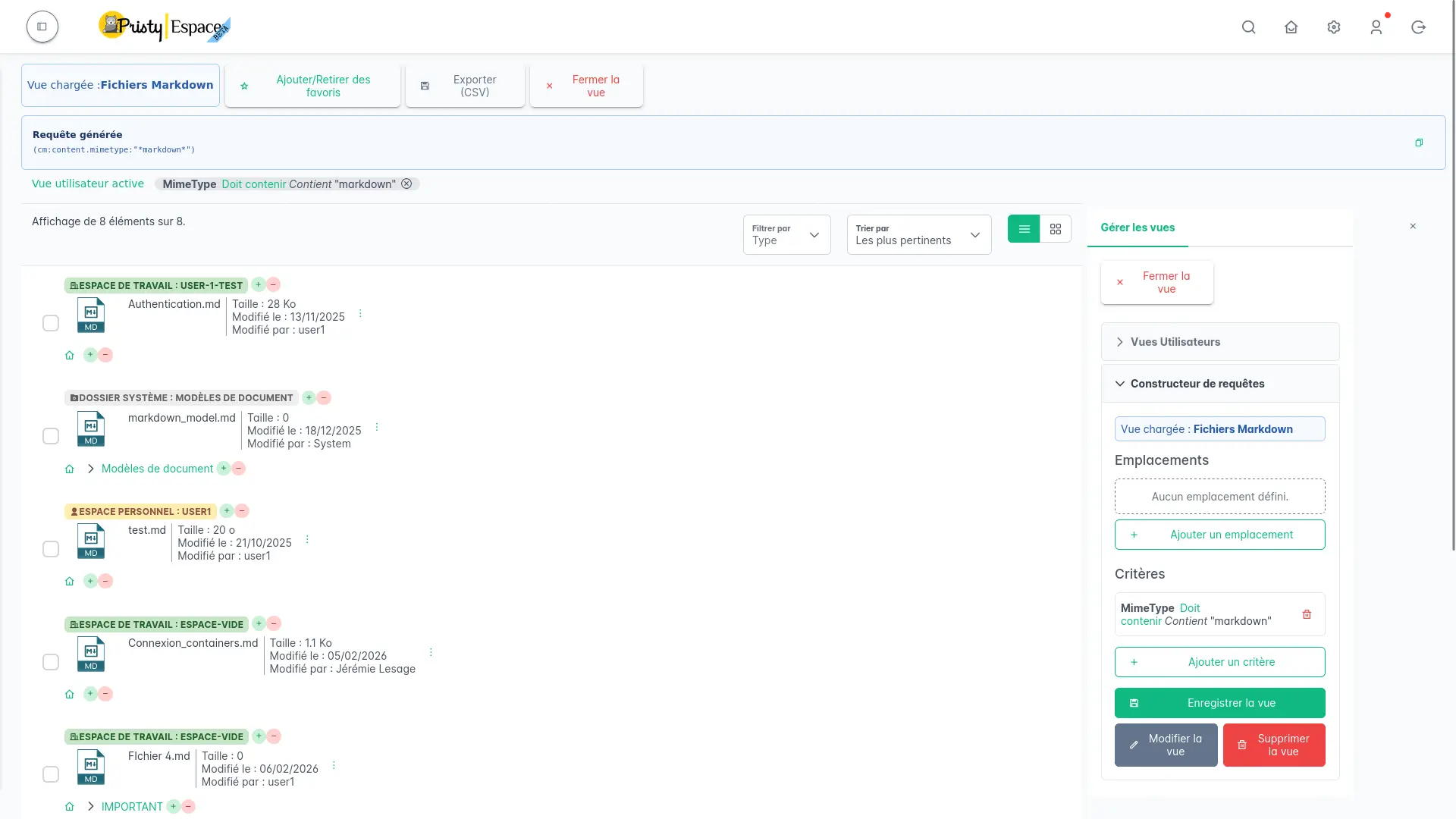
You knew advanced search. It becomes user views. Each user can now create, name and save their own search views — personalised filters and criteria that remain accessible in one click. Custom organisation, directly in your DMS.
Live classification plan
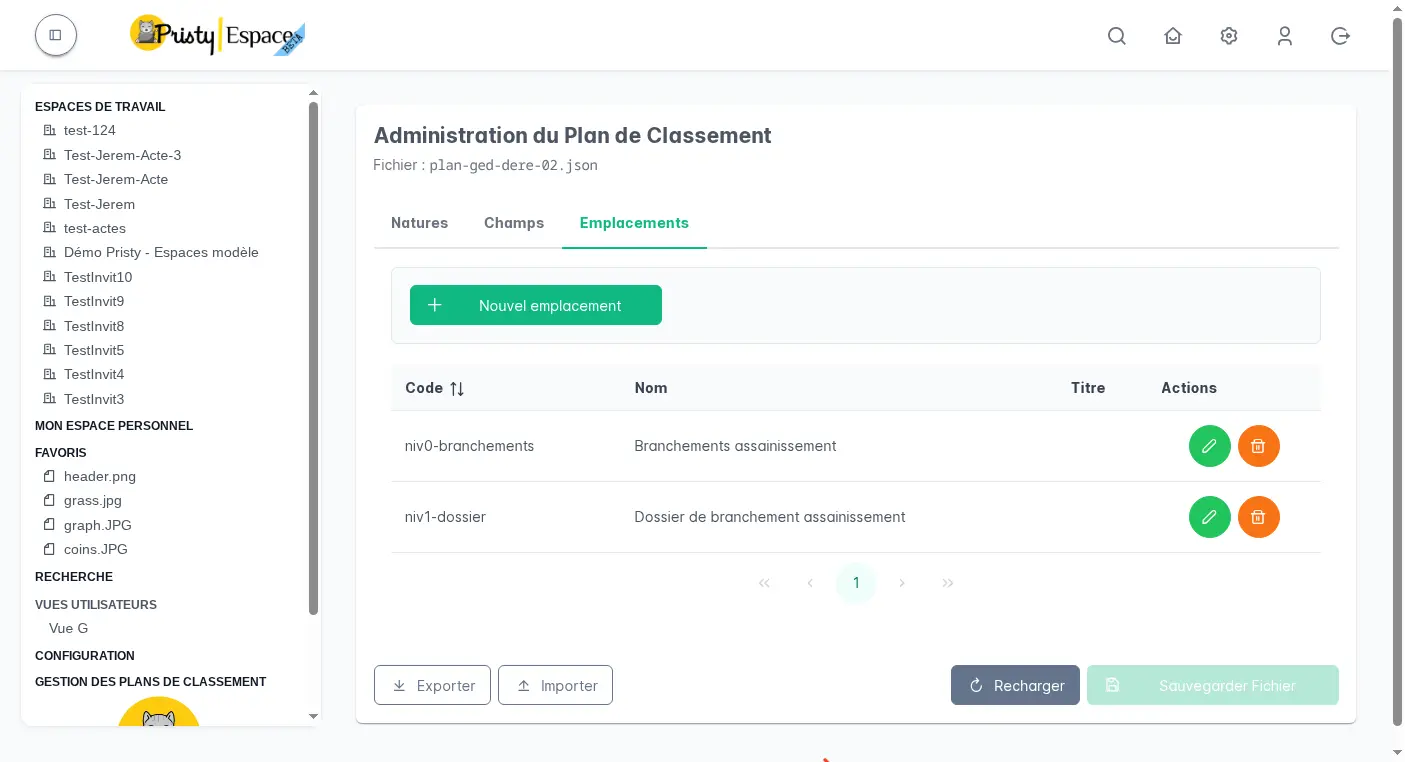
You can now apply a classification plan directly to a Pristy workspace, without interrupting activity. Once configured, it defines a folder hierarchy and available document types. When depositing a file, the user chooses its type — Pristy automatically creates the right folder (if it does not yet exist) and moves the document there. The result: consistent organisation, readable even outside Pristy (WebDAV, FTPS…), without heavy technical constraints.
No more misfiled or misnamed documents: your classification plan becomes a discreet safeguard, built into the workflow.
PDF editing tools
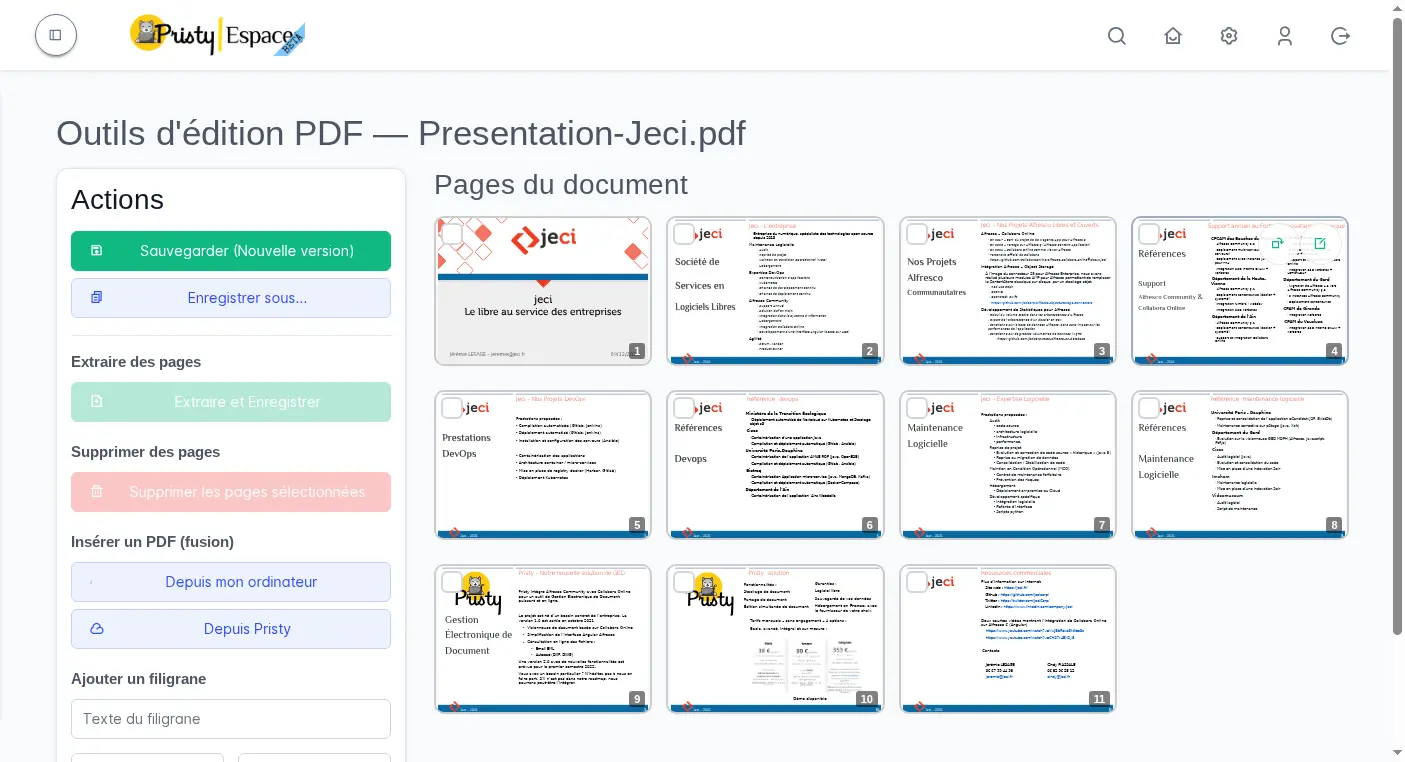
Pristy now integrates PDF editing tools directly in the interface, without a third-party application. From the viewer of a PDF document, a side panel gives access to:
- Reorder pages — rearrange pages by drag and drop
- Split — extract a selection of pages into a new file
- Merge — insert a file from your computer or from Pristy
- Redact — permanently hide sensitive areas before distribution
- Highlight — annotate your PDF documents directly
- Sign — sign your documents without leaving your DMS
The result is saved as a new version or via Save as, and remains available in your DMS like any other document.
Notes and text document editor
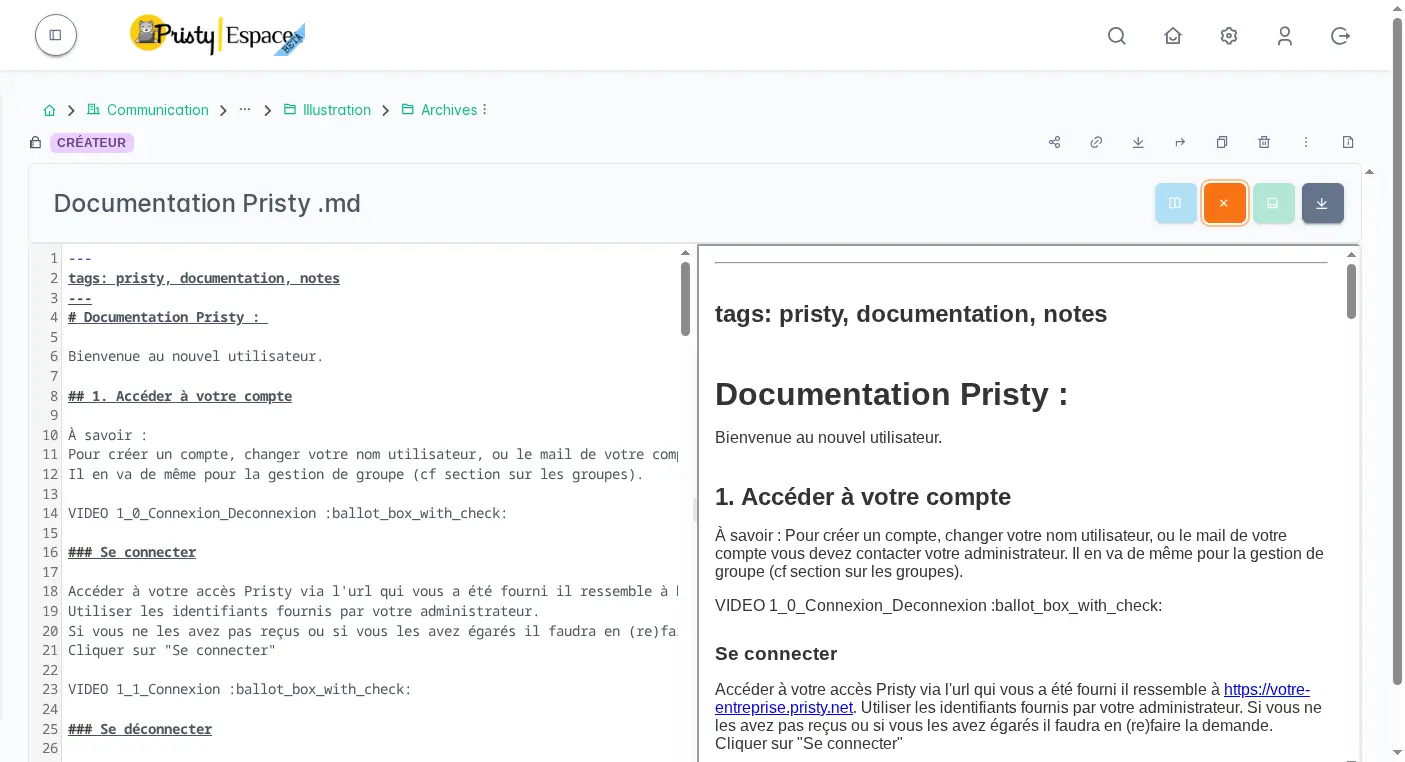
You can now create text notes directly from Pristy, without leaving your DMS. One click on “New file”, choose Markdown, and you are redirected to the built-in editor. Your documents and your notes in the same place — ideal for internal knowledge bases.
The editor, based on CodeMirror, supports .md, .html and plain text files with syntax highlighting.
Pristy Portail: the customisable dashboard
Portail
Version
1.0.0
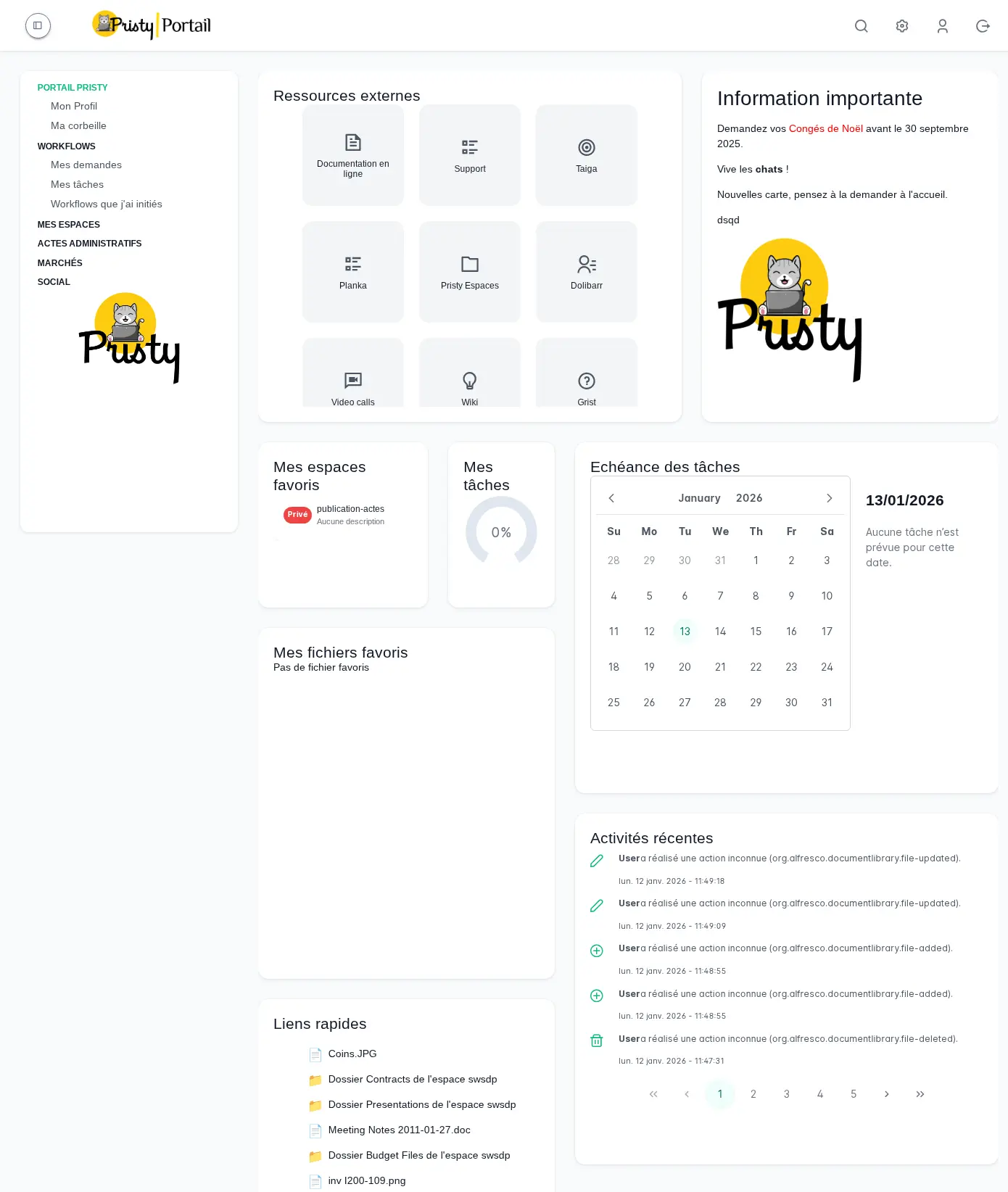
This is the major Portail highlight of 25.1: a fully customisable dashboard, to access what matters most from login — the right documents, the right activity, without unnecessary navigation.
Administrators compose template home pages by profile or department. Users then choose from the available templates — or build their own. Onboarding is immediate: blocks are freely dragged and dropped (recent documents, activity, external applications, Markdown content…), and a mini-map makes navigation easier in more elaborate configurations.
Each block is independently configurable, all modifications are versioned and rollback is always possible. The editor is accessible from a new entry in the administration menu.
This version also introduces a dedicated user profile page, accessible via /user/:id, with group management, quota and notification preferences.
Advanced administration tools
This version marks an important milestone for IT teams and technical administrators, with the arrival of powerful tools directly in Portail:
- Data model manager — Create custom Alfresco content types and aspects from a graphical interface, without server access. Define properties, constraints and associations, deploy in one click into the Data Dictionary.
- Model explorer — View all types and aspects defined in your repository, their properties and inheritance hierarchies.
- Node browser — Navigate the repository at low level: properties, metadata, aspects, permissions, versions. Saveable AFTS queries, full-screen file editing.
- Administration menu — Admin entry visibility adapts to the role of the logged-in user.
Pristy Marchés: enhanced DCE document management
Marchés
Version
0.4.0
Pristy Marchés continues to expand. Teams can now:
- Convert documents to PDF directly from the application,
- Copy the entire DA DCE to the DEFINITIVE DCE in one action,
- Manage document types across 3 panels (add, edit, administration),
- Configure lots and periods when creating a tender,
- Create folders, move and copy items,
- Generate ZIP archives for consultation.
Pristy Social: ASE shared documents
Version
1.2.0
Pristy Social 1.2.0 brings a long-awaited feature for child welfare services: shared document management for ASE workspaces. Documents shared across files are now accessible from a dedicated view, with conditional sorting by reference date.
Also…
- ZIP export — generate a ZIP archive of a folder or a selection of documents directly from Espaces.
- Overall stability — numerous fixes on Espaces and Actes (pagination, preview, actions, user views, attachment display) for a more solid platform day to day.
What’s next? 26.0 is in the works
Several workstreams are underway for the next major version:
Espaces
- Classification plan: reclassification of out-of-plan documents after plan evolution
- Real-time collaboration on Markdown and text files
Portail
- Enhanced administration: workspace management, monitoring tools
Thank you to our users and partners for their trust and support in the development of this open-source software.
Any questions?
Contact us
The information collected on this form are saved in a file processed by Jeci (4, rue Bartet - 21110 FAUVERNEY, info@jeci.fr, +33 9 72 38 21 92) in order to respond to your request for contact. To find out more about the management of your personal data and to exercise your rights, please refer to the notice attached to this link. The data marked with an asterisk in the questionnaire must be provided. Otherwise we will not be able to contact you. By filling in this form, you agree to the information entered being used for the purpose of the contact request.
Phone
09 72 38 21 92